


MPLS Parking
4.41.33K Reviews
App Specs
- Version
- 10.7.1
- Updated On
- License
- Free
- Downloads
- 100,000+
- Developer
- City of Minneapolis
- Categories
- Maps & Navigation
- Platform
- Android
Screenshots
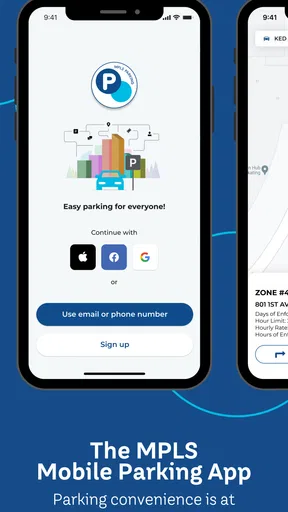
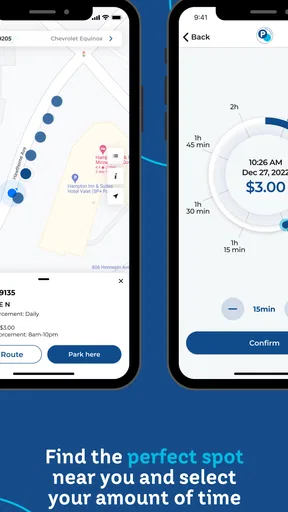
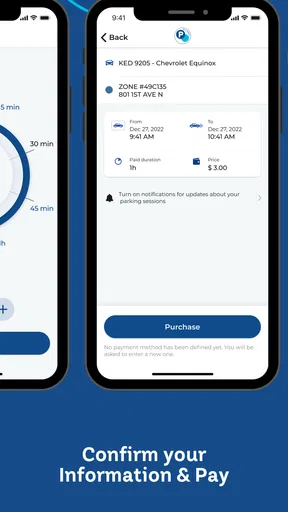
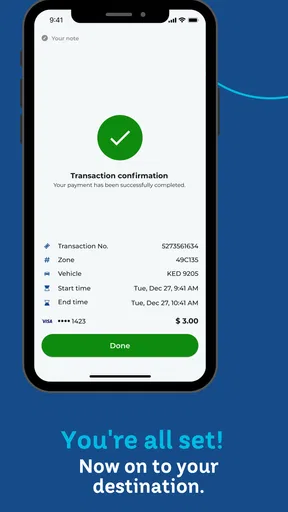
 Analysis by AppCompare
Parking in Minneapolis is the kind of task that can turn a short errand into an annoying search for coins, a nearby pay station, or a reminder to return before time runs out. I found MPLS Parking most useful when I treated it as a focused parking companion rather than a general navigation tool. It is a free Maps & Navigation app from the City of Minneapolis, brought to users through Flowbird, and its purpose is refreshingly narrow: help me handle mobile parking in the city.
That narrow purpose is also its main strength. I do not open it expecting turn-by-turn directions, restaurant discovery, or a full city travel planner. I open it when I am already thinking about where to leave a car and how to manage the parking session afterward. The experience makes the most sense for drivers who regularly park in Minneapolis and want a phone-based alternative to dealing with a meter directly.
With an average rating of 4.4 from around 5,700 ratings and more than 100,000 installs, it has clearly found a practical audience. I would still judge it by a more personal question: does it reduce the small points of friction that happen before, during, and after parking? In my experience, it can, provided I prepare before pulling into a busy area and do not mistake it for a replacement for every parking rule or navigation app.
How the current parking experience feels
The first thing I appreciate about MPLS Parking is that it keeps the parking task in view. Instead of making me work through a broad transportation interface, it is designed around the moment when I need to begin or manage a parking session. That focus matters when I am standing beside a car, carrying shopping bags, or trying to finish payment before traffic moves again.
The app is especially convenient for people who dislike handling cash or standing at a pay station in poor weather. A phone-based workflow can also be easier when I need to extend a session without walking back to the vehicle. That is a meaningful everyday benefit, but it depends on the phone being ready, the connection behaving, and the selected parking location matching the space where the car is actually parked.
A realistic use case is a quick appointment downtown. I arrive with only a short window, park, and use the app instead of searching for a machine. Later, if the appointment takes longer than expected, the phone gives me a way to deal with the parking session without abandoning the appointment. I still need to watch the time and follow the posted restrictions, but the process is less disruptive than repeatedly returning to the car.
The most important habit is checking the location before confirming anything. In a dense city, nearby streets can have different rules, rates, or operating conditions. I would not rely on the app alone to decide whether a space is legal. Street signs and curb markings remain the final authority, particularly around loading areas, temporary restrictions, residential controls, event activity, or unusual time limits.
Worth Reading Before You Choose

EA SPORTS FC Mobile 26 Is a Bigger Football Game, but It Takes Time

Flipboard Shows What News Apps Must Do Beyond the Feed

Switching to Android Auto Means Rethinking Your Driving Routine

Google Calendar Makes a Crowded Week Easier to Manage

Ludo King Makes the Most of the Minutes Between Plans

Baby Panda World Brings Quick Play to Modern Phones, but Its Game Library Feels Busy
Who gets the most value from it
This app is a good match for Minneapolis residents who park on city streets often enough to value a repeatable routine. It can also suit visitors who already know their destination and mainly need help with the parking transaction. The free price removes an obvious barrier, and the Everyone content rating makes it approachable for a broad audience, including households that want a simple parking tool rather than a complicated travel platform.
I see less value for someone who rarely drives into Minneapolis, already has a dependable parking routine, or usually parks in private garages with their own payment systems. It is also not the right primary tool for a person who needs route planning from another city, live traffic guidance, transit connections, or a broad search for attractions. A general maps app is better for those jobs, while MPLS Parking is more useful once the parking problem becomes the immediate problem.
Another group that should be cautious is anyone who tends to hand a phone to another passenger and forget about the session. Mobile payment is convenient, but convenience can make it easier to overlook a parking expiration or fail to notice that the wrong zone was selected. I prefer to treat the app as a record of what I chose, not as permission to stop reading signs.
A practical workflow that avoids common mistakes
My preferred workflow starts before I reach the curb. I open the app while the vehicle is safely stopped, make sure I know the street or nearby landmark, and compare the app's location choice with the physical signs. I then check the vehicle details and the intended duration before confirming. Those few seconds are more valuable than rushing through the first available option.
After starting a session, I keep the confirmation visible long enough to make sure the transaction has completed. I also make a mental note of the expiration time instead of assuming the phone will solve everything automatically. If I expect a meeting to run long, I plan for that before the remaining time becomes critical. This is one of the less obvious trade-offs of mobile parking: extending a session may be easier, but remembering to extend it is still my responsibility.
When I leave, I check that the session is no longer needed and keep any useful confirmation information until I am satisfied the visit is finished. That habit helps separate two situations that are easy to confuse: paying for a session and actually being parked legally. The app can support the first task, but it cannot make a prohibited space acceptable.
For repeat users, I would make the process part of a departure checklist: park, read the sign, select the location, confirm the vehicle, start the session, and set a personal reminder. That last step is worthwhile because a parking app is not necessarily a substitute for the driver's own time management. I find that this routine makes the app feel dependable without expecting it to do more than it was built to do.
What has changed and what the current version means
MPLS Parking has been available since August 20, 2015, so it is not a brand-new experiment. The current version is 10.7.1, and the app supports devices running Android 7.1 or later. For existing users, that combination suggests an established product that has continued through multiple revisions rather than a one-off utility that was abandoned after launch.
I would be careful, however, about reading a version number as a promise of a specific feature. A newer build can improve compatibility, correct problems, or adjust the interface without changing the basic parking workflow. What I can reasonably say from the current release position is that the app remains maintained enough to have a defined current version, while the core reason to use it is still mobile parking in Minneapolis.
That distinction matters when comparing it with a general maps application. A broad maps app may be updated frequently for roads, businesses, and navigation, but it is not automatically the best place to manage a city parking session. MPLS Parking's evolution is more relevant to the driver who wants a dedicated city parking experience. The product's value is not measured by how many unrelated tools it includes; it is measured by whether the parking steps are clear when I need them.
Existing users should therefore approach an update with practical expectations. I would install the current version rather than remain on an old build, especially if the phone is still supported, but I would also review the first parking session after updating instead of assuming every setting behaves exactly as before. Confirming the selected location, vehicle information, and session status is a sensible safeguard whenever an app changes.
How it compares with the usual alternatives
The most direct alternative is paying at a physical meter or pay station. That option can be perfectly reasonable when I am already beside the machine, have no phone battery, or do not want to create another digital routine. MPLS Parking becomes more attractive when I want to avoid a line, keep the transaction on my phone, or manage the session while I am away from the vehicle.
A general navigation app is better when I am still planning the journey. It can help me understand the route, estimate travel time, and locate a destination. MPLS Parking is more specialized once I have arrived and need to deal with the city parking process. I would often use both: one for getting there and the other for handling the parking task.
Private garage apps and facility-specific payment systems may be the better choice for a garage that does not use the city's parking workflow. Likewise, someone who primarily uses buses, trains, bicycles, or walking may gain little from a car-parking app. The right choice depends less on which app has the longest feature list and more on whether its parking environment matches the trip I am taking.
There is also a human alternative: ask a companion to watch the time or return to the meter. That can work, but it is less flexible than having the session details on my own phone. The trade-off is that mobile parking concentrates responsibility in one place. If my phone is unavailable, I need a backup plan, whereas a physical payment method may remain usable.
Where the experience still has limits
The biggest limitation is scope. MPLS Parking is not a complete answer to Minneapolis mobility. It does not replace reading curb signs, understanding local restrictions, or deciding whether a particular space is legal. It also should not be my only source of information when a trip involves complicated event parking, accessibility needs, commercial loading, or a private facility with separate rules.
There is ordinary phone friction too. A low battery, poor connectivity, a distracted driver, or a misread location can undermine an otherwise simple workflow. I would never attempt to operate the app while driving, and I would avoid leaving the payment step until I am blocking traffic or under time pressure. The app may make payment easier, but it cannot remove the consequences of a rushed decision.
Another limitation is psychological rather than technical: digital confirmation can feel more final than it really is. I have to remember that a successful payment does not necessarily mean I selected the correct zone or duration. The safest approach is to use the app alongside physical information at the curb, not instead of it.
People who need a unified view of parking, transit, walking, and navigation may find the dedicated design too narrow. In that case, a general city travel tool may be a better central app, with MPLS Parking used only when its specific payment workflow is needed. I would also skip it if I almost never park within Minneapolis and do not want to maintain a separate app for occasional use.
What I would watch as a regular user
If I continued using MPLS Parking, I would pay attention to how smoothly it handles the moments that matter most: identifying the correct location, confirming a session, extending time, and recovering from an interrupted attempt. Those details determine whether the app is merely available or genuinely dependable during a hurried visit.
I would also watch how well the current release fits newer and older phones. The stated minimum operating system is Android 7.1, which keeps the app accessible to many older devices, but users should still consider the condition of their own phone and its ability to handle location, notifications, and connectivity reliably. Compatibility on paper is not the same as a stress-free experience in a crowded street environment.
For returning users, the best sign of progress is not a dramatic redesign. It is a calmer parking routine: fewer moments of uncertainty, clearer confirmation, and less need to repeat a step. Since the developer is the City of Minneapolis, I would expect the app's usefulness to remain closely tied to how well it serves the city's parking context rather than becoming a general-purpose travel platform.
I would also keep an eye on how the app fits changing personal habits. If I start using garages more often, travel outside Minneapolis, or rely increasingly on transit, its role naturally becomes smaller. If I continue making short car trips into the city, its focused design becomes more valuable. That is an important point: the app is not something every driver needs all the time, but it can become a useful part of a specific local routine.
My recommendation after using it
I recommend MPLS Parking to Minneapolis drivers who want a straightforward way to manage city parking from a phone and are willing to verify the curb information themselves. The free app has a clear purpose, a mature presence, and enough practical value to justify keeping it available for regular city visits. Its strongest moment is the ordinary one: I have parked, I am away from the car, and I need a convenient way to handle the session without returning to a machine.
I would not recommend relying on it as the only parking authority, navigation app, or travel planner. People who rarely drive into Minneapolis may be better served by using the payment method already available at their destination. Drivers with complex parking needs should combine the app with signs, facility instructions, and a broader navigation tool rather than expecting one focused app to cover every possibility.
Overall, MPLS Parking succeeds because it does not need to be everything. It gives Minneapolis parking a dedicated mobile workflow, and that can remove several small annoyances from a busy day. My advice is to use it deliberately: check the zone, confirm the vehicle and time, keep track of the session, and treat the street signs as the final word. Used that way, it is a practical free tool rather than a source of false confidence.
The app is available to a broad audience under the Everyone rating, and its current 10.7.1 release keeps the product positioned as an established option for supported Android devices. I would install it if Minneapolis street parking is a recurring part of my life. If it is not, I would stick with a general maps app or the payment method at the place I visit. For the right driver, though, the focused parking workflow is the reason to keep it on the phone.
Pros
- Find and pay for parking through a dedicated mobile experience.
- Can reduce the need to search for cash or use physical payment machines.
- Useful for checking parking options before reaching your destination.
- May support digital receipts for easier expense tracking.
- Convenient for drivers who frequently use participating parking areas.
Cons
- Availability depends on whether your local parking authority supports MPLS Parking.
- Location services and mobile data may be required for reliable use.
- Payment processing may fail if connectivity is weak or the app has an outage.
- Parking rates
- time limits
- and rules can vary by zone and may cause confusion.
- Users must monitor sessions carefully to avoid extra charges or parking violations.
FAQs for MPLS Parking
What is MPLS Parking and what can I use it for?
MPLS Parking is a parking-related app designed to help users find and manage parking in Minneapolis–Saint Paul. Depending on the location and available services, it may provide information about nearby parking facilities, rates, availability, directions, and payment options. Before downloading, check the app’s current listing and supported locations, since features can vary between parking operators and may change over time.
Can I pay for parking through the MPLS Parking app?
The app may support mobile parking payments for participating locations, allowing you to select a parking area, enter your vehicle and payment details, and extend a session remotely when permitted. However, not every garage, lot, or street space necessarily accepts app payments. Always confirm that the location is supported and follow posted signs, because payment through the app does not replace local parking rules.
Does MPLS Parking show real-time parking availability?
MPLS Parking may provide availability or occupancy information for selected facilities, which can make it easier to plan a trip before arriving. This information should be treated as an estimate rather than a guarantee, especially during concerts, sporting events, severe weather, or peak commuting hours. Availability can change quickly, so review the latest details and have an alternative parking option in mind.
What information and permissions does MPLS Parking require?
To provide parking searches, directions, location-based results, or payment services, MPLS Parking may request access to your location, notification features, and account or payment information. You can usually control many permissions through your phone’s settings, but limiting access may affect certain functions. Before creating an account or adding a payment method, review the app’s privacy policy and the permissions shown in the official store listing.
Is MPLS Parking free to download, and are there additional fees?
The download may be free, but using a parking facility or payment service can still involve parking charges, convenience fees, transaction fees, or other costs set by the operator. Prices and policies may differ by location and time of day. Review the total amount displayed before confirming a payment, and check whether cancellation, refunds, extensions, or expired sessions are handled through the app or directly by the parking provider.


